The Importance of Having a Good Backup Policy
- January 24, 2007
- 5:12 pm
- Articles
January 24, 2007
Every now and then some event occurs which draws our attention again to the problems people experience because of not having instituted a coherent and logical backup policy at the right time. Generally, when we notice this with one of our users, it is too late to help. If you have a problem with your computer’s hard drive, and the data becomes unreadable, then if you don’t have a good backup, you are probably in serious trouble.
Over the years I have worked with PC’s, I have seen hard drive technology improve a thousand fold. Not only are hard drives much larger now than they were when the PC was first introduced, but they are also far more reliable. In the early 80s, when I worked as a computer consultant, one of the main reasons for someone to call us in was a problem with a hard drive. In those days, a 20 Mb hard drive such as the Seagate ST-251 (a very popular hard drive) cost several hundred dollars, and had an effective life of only a couple of years, on average. Replacing such a hard drive cost the PC owner a few hundred for the hard drive and the additional costs of removing the old drive and installing the new one. Besides that, if there was the cost of restoring the data from the old hard drive. Sometimes, we could read some of the data from the old hard drive, and transfer it to a tape drive, and from there transfer it to the new drive, but sometimes the hard drive was too corrupted (or completely dead) and we couldn’t retrieve any data.
It has been clear to anyone who’s ever suffered this sort of catastrophe that the costs of replacing the data far exceed the costs of repairing the hardware. A list of customers which has been built up over the years represents a valuable asset for your company, and might take years to re-build or replace, in the absence of a good backup.
What we recommend:
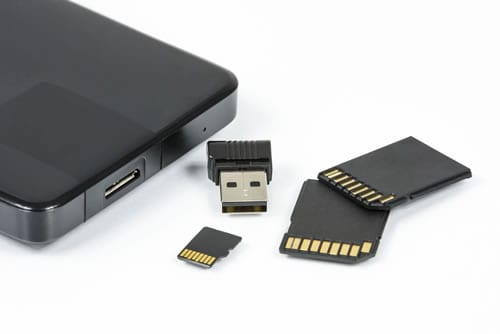
These days, there are many options for devices to create backups on. One popular method used these days by many users is an external hard drive. One can buy an external hard drive enclosure, with a hard drive that is the same size or bigger than that in your computer. This connects easily to your PC via a USB port. You don’t even need to shut the computer down to connect the hard drive via the USB port – a very nice feature of Windows XP.
Once the hard drive is connected, it is simple to copy one’s valuable data to the removable hard drive, which can then be stored in a safe place. You can create a batch file which will automatically copy all the files and folders you specify, and then run that batch file with a click each evening before shutting down. I actually leave my PC on all the time, so I simply start it running, turn off the monitor and leave the office. The backup is completed and waiting for me in the morning!
You can also use a specialized backup program such as Symantec’s “Backup and Restore”, which uses Norton’s famous “Ghost” technology to create an image of your entire hard drive on your backup disk. The big advantage of this method of creating backups is that it will save everything on your PC, including the settings contained in the registry, and other hidden files. Also, it will back up all your programs that have been installed. In this way, if you have a hard disk crash, all you need to do is install the new hard drive, and then run the restore utility that comes with Symantec’s program, and all your files, folders, programs, and settings will be automatically restored! This is an enormous time saver if you are ever unfortunate enough to have a hard drive crash.
One reason to be cheerful these days is that hard drives are very reliable indeed, and so they hardly ever crash, or begin to degrade, gradually losing bits of data as time goes by – as used to happen frequently with the older generation of hard drives. Generally, you’ll be replacing your entire computer before you replace your hard drive. On the other hand, it is because hard drives are so reliable nowadays that many people feel they don’t need to ever worry about hard drive problems. This is a dangerous kind of somnambulance to allow yourself to fall into.
Besides the problem of hard disk crashes (where the disk becomes totally unusable due to mechanical failure) there is the problem we see more frequently of corruption of files and data due to viruses and spyware and other forms of “malware” that float about and may infect your machine.
We have encountered situations with clients where one or more machines are so infected by spyware that the machines seem like they’re crawling. Besides the slowdown caused by all that unwanted baggage of spyware, etc., some of these unwanted programs make it difficult or impossible to set up networks, to obtain a reliable internet connection, and more. Generally, the worst sorts of spyware come from game sites, free music download sites, pornography sites and similar. In one office, the owner was allowing an employee free access to whatever she wanted to do on the ‘net, and she was visiting chat sites, game sites, and all sorts of other “entertainment” sites. Their computer was riddled with viruses and spyware, and it took the technicians quite some time to remove everything. On top of that, the owner didn’t want to believe that she was responsible for downloading this unwanted stuff!
So, protect yourself, by installing good anti-virus and anti-spyware software, and make sure you have good backups. Also, make sure you keep at least one backup once a week at some off-site location. That way, if there’s a fire or theft, at least you have your irreplaceable data safe somewhere.